Claude Video Generation: How to Build a Full Workflow with MCP
Learn how to build a complete Claude video generation workflow with an MCP.


TL;DR
- Every "Claude + MCP" video guide out there means the same thing
- 60 Minute Creator's MCP integration is structurally different
- Real setup: one server URL, a copy-paste prompt, OAuth sign-in
- Generation runs on your own connected provider key and never billed through the connection
- Every cost-generating or destructive action requires an explicit confirmation
- Available on Pro plan and above
At least eight platforms now offer MCP, and every one of them means the same narrow thing: describe a clip, Claude picks a model, one clip comes back in chat.
What 60 Minute Creator's MCP connection actually does is different: Claude can plan, build, and run an entire multi-scene production, with real cost transparency built into the mechanism itself, not just generate one asset.
How is this different from every other guide?
Higgsfield, HeyGen, OpenArt, Renoise, AI Box, and AITuber all offer the same shape: describe a clip, Claude picks a model, one clip comes back. That's genuinely useful for a single asset, but it's not a production system.
Here, Claude runs a documented interview first:
What the video is about, whether scenes should be generated video or stitched still images, what happens in each scene, and which aspect ratio.
Everything else is optional and defaults to off, so Claude offers it in one line: a consistent character, a voiceover, B-roll, music, a visual style, a destination. From your answers, it builds the entire workflow in one go, checks it, and tells you what it made before anything runs.
How do you actually connect Claude to it?
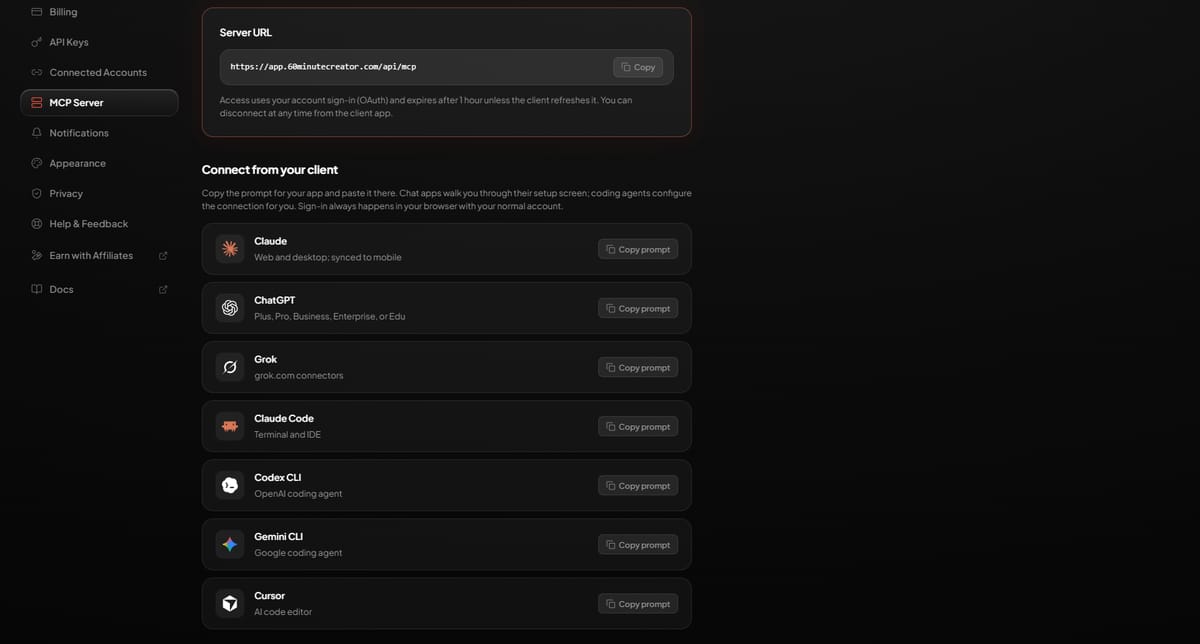
Open Settings → MCP Server.
The Server URL card gives you https://app.60minutecreator.com/api/mcp, worth knowing if you ever need to configure a connection manually, but for Claude specifically you won't need to type it yourself.
Under Connect from your client, find the Claude row (web and desktop, synced automatically to mobile once connected) and click Copy prompt.
Paste that prompt directly into a Claude conversation. Claude walks you through its own connector settings from there.
When the sign-in window opens, sign in with your normal 60 Minute Creator account and approve access. That's the entire authentication step, no API key is created or needed for this connection itself, it runs on your account sign-in (OAuth), the same way logging into the app in a browser does.
Access expires after 1 hour unless Claude refreshes it automatically in the background, which it normally does without you noticing. If a connection ever does expire, reconnecting is the same one-step process: copy the prompt again, paste it, sign in.
The prompt typically ends by having Claude verify the connection itself, usually by listing your existing workflows back to you, so you know immediately whether it worked.
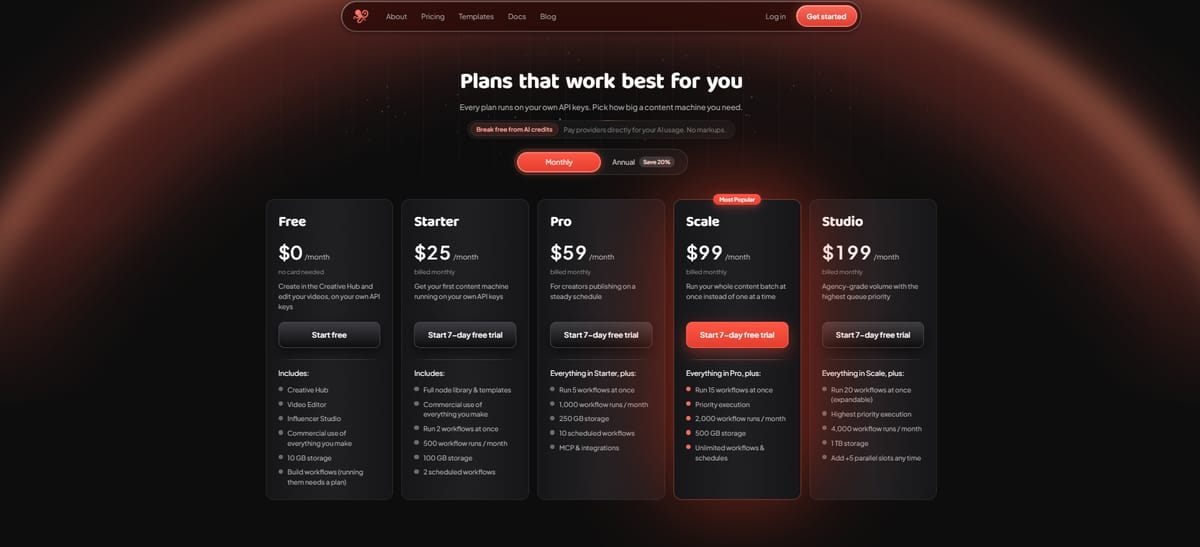
One thing worth knowing before you start: this requires the Pro plan or above. Starter accounts that attempt to connect will see an upgrade prompt instead.
How do you connect ChatGPT?
Find the ChatGPT row under Connect from your client and click Copy prompt. ChatGPT needs a Plus, Pro, Business, Enterprise, or Edu plan for this to work.
The prompt walks you through one extra step Claude doesn't need: turning on Developer mode first, under Settings → Connectors → Advanced settings, before the connection can complete. Once that's on, sign-in happens the same way, your normal 60 Minute Creator account, no API key required.
How do you connect Grok?
Click Copy prompt on the Grok row. Grok handles connectors differently from the others, management happens at grok.com/connectors rather than inside a chat conversation. The prompt walks you to the right place to finish it.
How do you connect Claude Code?
Claude Code is a coding agent, not a chat app, so its prompt behaves differently once pasted: instead of walking you through settings screens, it configures the connection automatically. It finishes with a short command you run in your terminal to complete sign-in, the prompt tells you exactly when to run it.
How do you connect Codex CLI?
Same shape as Claude Code: paste the prompt from the Codex CLI row, and OpenAI's coding agent configures the connection itself rather than presenting a settings screen. A terminal command completes sign-in at the end, timed by the prompt.
How do you connect Gemini CLI?
Paste the prompt from the Gemini CLI row. Google's coding agent follows the same automatic-configuration pattern as the other CLI tools, finishing with a terminal command for sign-in.
How do you connect Cursor?
Click Copy prompt on the Cursor row. As an AI code editor rather than a chat interface, Cursor configures the connection automatically the same way the CLI agents do, no manual settings navigation required.
Every one of these seven clients signs in through the same OAuth flow, your normal 60 Minute Creator account, no API key created for the connection itself. Only the AI providers powering generation need their own keys, and that's separate from which client you're using.
What can Claude actually do once connected?
Workflows: list, inspect, create, edit the node graph, validate, publish, run, and view execution history.
Influencers: list, create, manage images, and generate new angle shots, this uses your own provider keys, so it costs money, and Claude lists the available angles with per-image pricing before generating any.
Here's what that actually looks like in practice:
You: Add some angle shots to my influencer Mara.
Claude: Mara currently has a hero shot only. I can generate additional angles for her, here's what's available:
Side profile - $0.04
Three-quarter - $0.04
Back view - $0.04
Full body - $0.06
Which of these would you like? I won't generate anything until you confirm.
Media library: browse, search, upload from a URL, rename, tag, move, delete.
Cloud storage: browse your connected Google Drive or Dropbox, import or export files.
Costs: your real provider spend, totals, trends, and breakdowns by workflow, model, or provider.
Which providers actually power the generation?
Provider | Powers |
|---|---|
Atlas Cloud | LLM, Agent, Image, Video, Voice, Lipsync, Influencer Studio |
How does it stop Claude from spending money or breaking things by accident?
Every billed action is a two-step confirm. Before a workflow runs, Claude shows exactly which steps will generate, with the model and price for each, and waits for a go-ahead.
Deleting anything, or publishing a workflow, works the same way, a preview first, then an explicit confirmation before it happens. Nothing spends money or gets deleted from a single request.
Generation itself always uses your own connected provider keys.
Nothing can spend money on a provider you haven't connected, and the connection to Claude itself never touches billing directly.
FAQ
Do I need an API key to connect Claude?
No. The connection itself uses your normal account sign-in (OAuth). API keys are only needed separately, for the AI providers that power actual generation.
Which AI clients besides Claude can connect the same way?
ChatGPT, Grok, Claude Code, Codex CLI, Gemini CLI, and Cursor all connect through the same MCP server, each with its own copy-paste setup prompt.
Does Claude generating video cost extra on top of my subscription?
Generation is billed directly by whichever provider you've connected, at their real rate, with no markup. The MCP connection itself doesn't add a separate cost.
What happens if my provider doesn't support a feature a workflow needs?
The app falls back to fal.ai automatically for that specific node. This requires a valid fal.ai key saved in your account even if it isn't your chosen default.
References
- AI Guide
Was this helpful?


