How to Start a Faceless YouTube Channel With AI (2027 Guide)
earn how to start a faceless YouTube channel with AI, from choosing a profitable niche to creating videos without appearing on camera.


TL;DR
- $895 total over two years. Real success case, Fortune-verified
- Realistic beginner range: $100–$1,000/month by month 3–12
- Best real RPM by niche: finance $10–25, tech/AI $8–25, business $8–19, self-improvement $5–11, true crime $4–15, history $2–12
- Ambient/sleep content has conflicting data. Reported anywhere from $0.50 to $11 RPM.
- A typical AI tool stack costs $103–122/month. Four separate subscriptions, verified directly
- The real workflow: Trigger → Agent → Image → Video Generation → Compose → Output.
- YouTube monetization threshold: 1,000 subs, 4,000 watch hours. Usually 3–6 months of posting
- AI replaces scriptwriting, voiceover, and visuals. It doesn't replace niche selection, fact-checking, or judgment
Most guides to faceless YouTube lie to you.
They either oversell it as easy passive income, or they drown you in a dozen expensive software subscriptions. Worst of all, they leave you without an actual plan. This guide is different.
Instead of vague promises, you are getting the exact range of what creators actually earn. You will see a verified success case, a verified failure case, and the real cost of running this business.
Even better?
We are going to show you a cheaper way to build a channel using just one software account instead of four.
Let’s start with the question everyone wants answered.
How much do faceless YouTube channels actually make?
Let’s look at the two extreme ends of the spectrum, starting with the absolute ceiling of this business.
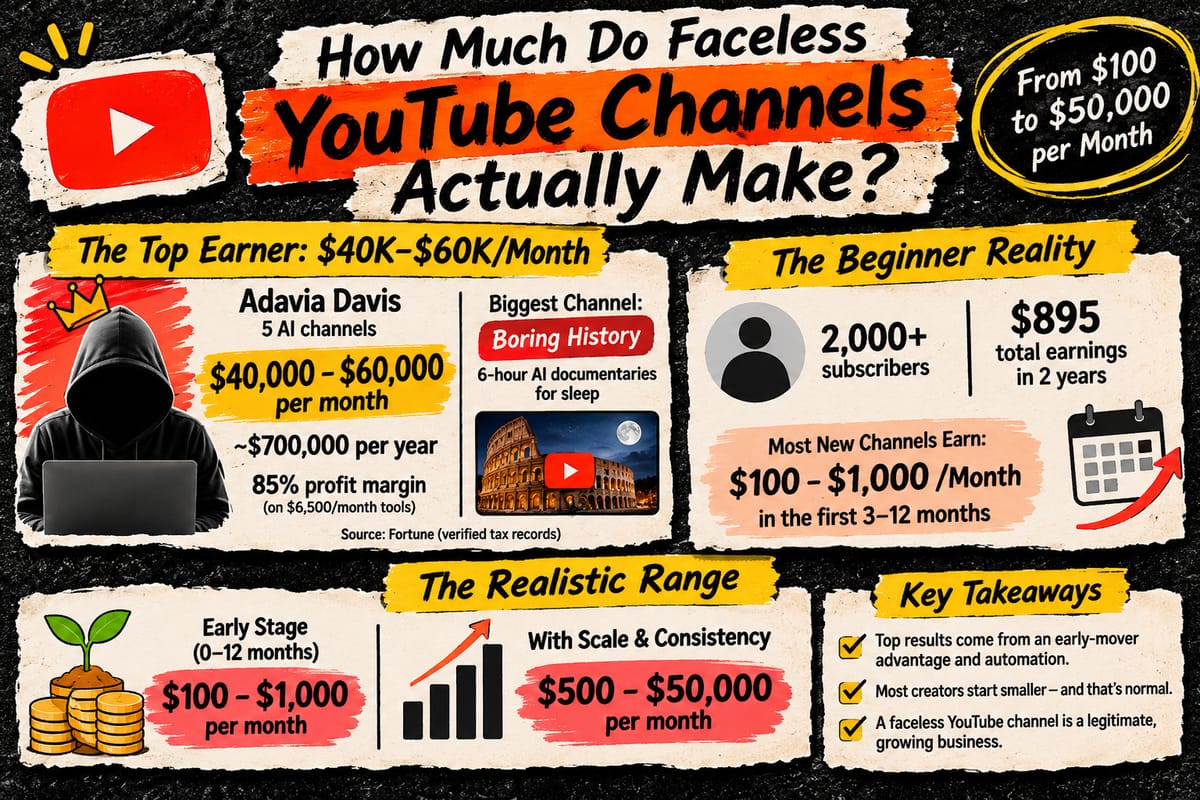
Recently, Fortune magazine verified the actual AdSense records of a 22-year-old creator named Adavia Davis. They didn’t just take his word for it and reviewed the tax logs.
Davis runs a network of five AI-generated faceless channels that pull in between $40,000 and $60,000 every single month. That scales out to roughly $700,000 a year, operating at a massive 85% profit margin on just $6,500 in monthly tool costs.
His biggest earner is a channel called Boring History. It publishes six-hour long, AI-narrated documentaries specifically designed for people to fall asleep to. But that is the extreme top.
On the other end of the spectrum, real, small channels tell a very different story.
One educational creator with just over 2,000 subscribers reported earning only $895 total. That was the payout for posting 12 videos across two full years of work. Most new channels land somewhere between those two extremes.
When you are just starting out, you will almost always land closer to the lower end.
If you launch a new faceless channel and cross 2,000 subscribers, you might still earn under $1,000 total in your first year. A truly realistic range for a beginner, combining both AdSense and affiliate income, is roughly $100 to $1,000 a month during your first three to twelve months.
Only once you achieve real scale, consistency, and find the right niche does that number grow toward $500 to $50,000 a month. That is not a discouraging number. It is simply an honest one.
The outlier results we see from top creators come from an early-mover advantage and custom-built automation pipelines.
Most people starting today are building the smaller, slower kind of channel first.
That is not a failure. It is a legitimate, growing business.
Which faceless YouTube niches pay the most?
Niche matters more than almost anything else in this business.
It dictates exactly how much advertisers are willing to pay to get in front of your audience.
To give you an accurate picture, we pulled real revenue-per-thousand-views (RPM) data across the most popular faceless categories. This isn't based on a single guru's claim, but aggregated from multiple independent sources.
Niche | Realistic RPM range |
|---|---|
Personal finance / investing | $10-25 (up to $40 for premium sub-niches like credit cards and investing) |
Tech / AI tutorials | $8-25 |
Business / entrepreneurship | $8-19 |
Self-improvement / motivational | $5-11 |
True crime / mystery narration | $4-15 |
History / educational | $2-12 |
As you can see, the numbers vary wildly depending on the topic.
But there is one specific niche that deserves an honest red flag instead of a clean, predictable range. That is ambient and sleep content. This category is a massive gamble.
One source reports it as a strong earner with a roughly $11 RPM. Yet, a completely separate source calls this exact same category an "RPM trap," claiming it pays as low as $0.50 to $2.50.
When two credible sources make opposite claims about the same niche, it tells you the data is genuinely unsettled. If you are drawn to ambient content because of success stories like Davis's flagship channel, do not plan your budget around either extreme.
Treat the real number as a total unknown until you start generating your own data. It is also worth knowing that your payout is not flat year-round.
Finance content, for example, typically runs twice as high in the fourth quarter because advertisers spend heavily on holiday financial planning. Conversely, almost every category dips by 20% to 40% in January and February when corporate ad budgets reset.
So, why are creators still flooding into this space?
According to a recent industry report, 84% of creators now use AI tools in their daily workflow.
Even more telling: top earners use AI at roughly twice the rate of average creators. That gap exists because AI removes the single biggest bottleneck in video creation.
You no longer need to personally research, script, generate visuals, record narration, and edit every single video by hand.
How does the YouTube algorithm actually treat your video?
Two numbers matter more than anything else once a video goes live: click-through rate (CTR) and watch time. Both are deeply misunderstood. Most of the common advice around them is either completely outdated or dangerously oversimplified.
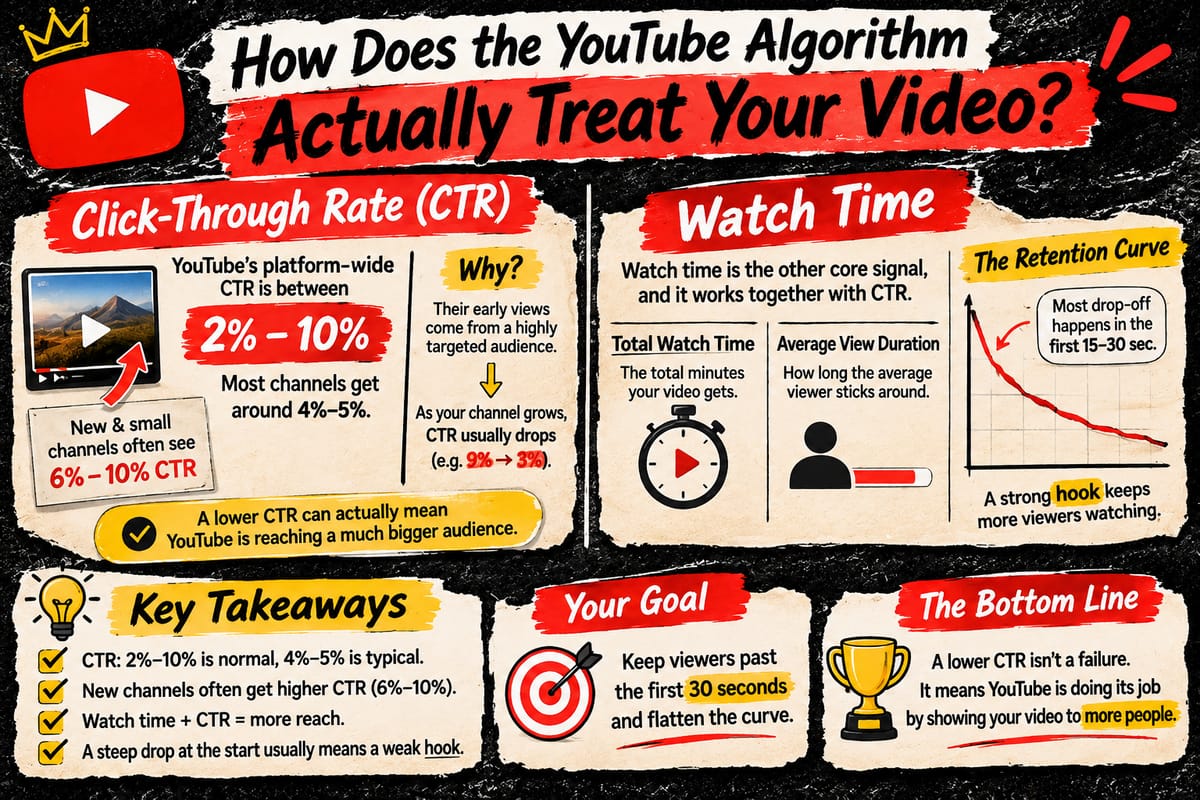
Click-Through Rate: YouTube's own data puts the platform-wide CTR range between 2% and 10%. Most channels land right around 4% or 5%. Strangely, new and small channels often see a much higher CTR. sometimes 6% to 10% than massive, established channels.
This is not because their content is better. It happens because their early views come from a highly targeted, warm audience that is actively seeking out their videos. As your channel grows, YouTube starts pushing your videos to a broader, colder audience.
When this happens, your CTR will naturally drop. It is incredibly common to see your CTR plummet from 9% down to 3% even while your total views climb. That is not a failing video. It is the exact opposite. It means the algorithm is doing its job by expanding your reach far beyond the people who already know you.
Watch Time: Watch time is the other core signal. It works side-by-side with CTR, not instead of it.
To measure this, YouTube tracks two distinct metrics.
To measure this, YouTube tracks two distinct metrics. First is total watch time, which is the overall minutes your video accumulates. Second is average view duration, which is how many minutes the typical viewer actually sticks around.
If your video holds attention well, the algorithm will push it hard. In fact, YouTube often starts promoting a high-retention video long before its total view count looks impressive. Most of your viewer drop-off will happen in the first 15 to 30 seconds.
This is exactly why your hook matters just as much as your thumbnail. A steep dip at the very beginning usually means your opening promised something the actual video was slow to deliver.
Once a viewer makes it past that 30-second mark, your only goal is to flatten the curve.
You want to stop bleeding viewers steadily, a trend you can track directly inside the retention graph of your YouTube Studio.
Do comments actually matter for ranking?
This area of the platform is genuinely less settled than most internet gurus suggest.
For years, the common wisdom was simple. Likes and shares carried real ranking weight, while your comment count barely mattered at all.
Recent industry reporting signals a massive shift. YouTube is increasingly analyzing comment velocity, reply rates, and the overall depth of a video's comment section. The algorithm uses these metrics to evaluate whether your video builds genuine human engagement rather than just passive watch time.
Keep in mind that this data is not a direct statement from YouTube itself. You should treat it as an evolving signal worth watching, not a permanent, settled rule. The core fundamentals of the platform remain exactly the same.
Total watch time and average view duration are still the confirmed ranking factors. The comment section is simply a secondary layer of optimization built on top of that foundation.
How much does a typical AI tool stack actually cost?
Nearly every faceless YouTube guide recommends the exact same strategy. They tell you to buy one tool for scripting, a separate subscription for AI voices, another for video generation, and a fourth for final editing.
To see what that actually costs, we checked the current pricing pages for the most common tools creators use.
Tool | Monthly billing | Annual billing |
|---|---|---|
ChatGPT Plus or Claude Pro | $20/mo | $20/mo |
ElevenLabs Creator (voice) | $22/mo ($11 first month) | $18.33/mo |
InVideo Plus (video generation) | $60/mo | $50/mo |
CapCut Pro (editing) | $19.99/mo | $14.99/mo |
Total | ~$122/mo | ~$103/mo |
Stacking subscriptions like this creates a hidden headache.
Each software company bills you using completely different systems. Some charge by monthly minutes, others by character counts, and some by total generations. Running out of credits on just one tool mid-month completely halts your production pipeline.
Your only options are to wait for the monthly reset or pay for an expensive top-up. You end up managing four separate subscriptions, tracking four separate usage limits, and paying four separate bills every month.
Is there a cheaper way to build a faceless AI workflow?
Editing is where most creators actually lose their time. It is rarely the filming or scripting phase that drags you down.
Data from creator forums shows that final editing consistently takes three to eight times longer than scripting. This is the real bottleneck of a manual, multi-tool workflow. You can easily batch-script and batch-generate your raw footage in a single afternoon, then lose the rest of your week trying to piece it all together by hand.
The Automated Solution: Node-Based Pipelines
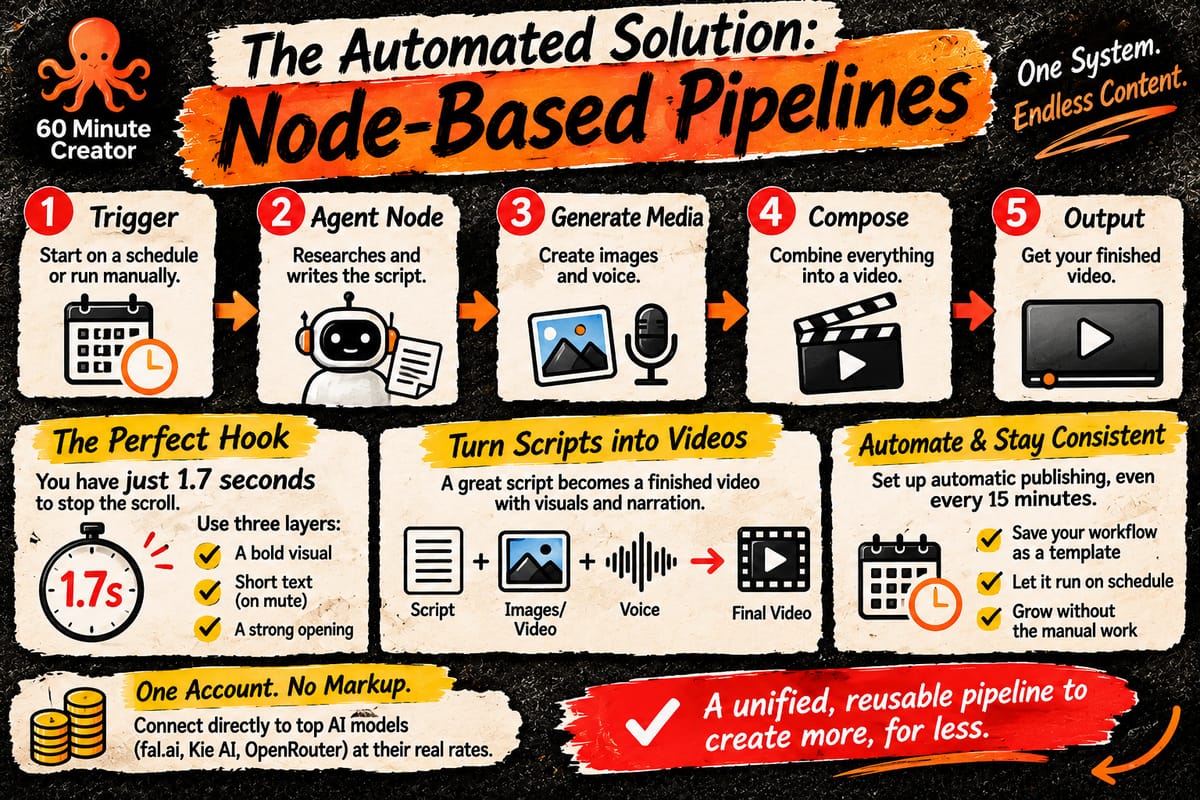
Instead of stacking four separate software accounts, we use a single, unified system. Here is what an actual production pipeline looks like inside the 60 Minute Creator node-based workflow builder.
This exact framework works seamlessly whether you are building long history documentaries, quick book summaries, or true crime narration.
Everything starts with a Trigger. This is the spark that kicks your workflow off. You can set it on a fixed schedule so new episodes publish automatically, or trigger it manually whenever you are ready to run a batch.
From there, the data flows into an Agent Node. This node automatically researches your chosen topic and writes the complete script. It handles the writing exactly like a human researcher would after spending hours digging through sources.
How Do You Prompt Your Agent to Write an Unskippable Script?
A script is only as good as its opening. Research from Facebook shows that mobile users give a piece of content an average of 1.7 seconds before deciding whether to keep watching or scroll away. That window is just as brutal on YouTube.
The Agent node handles the research and structure easily.
However, a truly unskippable hook requires three specific layers working together in that first split second: a visual that interrupts autopilot scrolling, a short on-screen text line for viewers watching with the sound off, and a spoken opening that seals the deal.
Because the Agent is writing the script for you, your job is to give it the right constraints.
When you brief your Agent node, do not just ask for a generic script about a topic.
Instruct it to build these three layers into the opening explicitly. Tell it to start the video with a bold claim, a stark before-and-after contrast, or a direct question aimed at your exact target viewer.
How Does a Script Turn into a Finished Video?
Once perfected, that script automatically feeds into the next steps of your pipeline.
First, it triggers an Image Generation or Video Generation Node to create the raw visuals your video will use. Simultaneously, a Voice Generation Node turns the text into lifelike narration.
Next, a Compose Node stitches the narration, visuals, and timing together into an actual finished video. Finally, the Output Node is where your completed file lands, fully rendered and ready to publish.
Once you build this pipeline once, it is completely reusable. You simply save it as a template. Every future episode becomes a matter of feeding in a single new topic, rather than rebuilding a pipeline or juggling four different software logins.
How Do You Use Automation to Maintain Consistency?
Once your workflow is built and saved, automated scheduling solves the other half of the creator problem: publishing consistently without manually uploading each file. Your workflow can run automatically at set intervals, even as often as every 15 minutes if you are publishing at a massive scale.
It gives you the exact same result a manual batching system works toward through calendars and reminders, just without anyone needing to remember to hit publish. The real difference here isn't automatically a lower total bill.
That ultimately depends on your content volume and which AI models you choose to power your system. Your content generation is billed directly by the infrastructure providers themselves whether you connect fal.ai, Kie AI, or OpenRouter at their real, raw rate with absolutely zero markup. The real difference is structural.
You get one account with a direct, no-markup connection to the AI engines doing the actual work, instead of four separate subscriptions each fighting you with their own credit systems, reset dates, and overage charges.
How long does it take to make money on a faceless channel?
The average creator across all content types takes about six and a half months to earn their very first dollar. Faceless YouTube channels specifically tend to require three to six months of highly consistent uploading.
To get there, you generally need to publish two to three videos every single week just to pass YouTube's current monetization threshold: 1,000 subscribers and 4,000 valid public watch hours within a 12-month window.
That entry bar is about to double. YouTube confirmed on its Help Center that starting February 1, 2027, new applicants to the Partner Program will face a much steeper climb.
You will need 8,000 qualified watch hours in the previous 365 days, or 20 million qualified Shorts views within a 90-day window. The 1,000-subscriber requirement is the only rule that stays exactly the same. If you manage to join the Partner Program before that cutoff date, you are completely grandfathered in and unaffected.
If you are launching a new channel right now, this is the exact deadline that matters.
Reaching your 4,000 hours before February 1, 2027, lets you secure your spot under the current, easier rules. Starting after that date means you will be building toward the massive 8,000-hour milestone from day one.
Even when you cross that finish line, your initial revenue at 4,000 hours is typically small, often landing under $50 a month. Reaching a meaningful, living-wage revenue routinely takes past the 12-month mark under the best conditions. The upcoming rules simply make that timeline longer for anyone who misses the cutoff.
If you hit month four with absolutely zero revenue, you are not failing. You are on a perfectly normal schedule for this specific format. But with a firm deadline on the horizon, there is finally a real, dated reason to build your automation pipelines and move with some urgency.
What can't AI do for a faceless channel?
AI completely replaces your rough script draft, your voiceover narration, and your raw visuals.
These are the three things that used to require a professional writer, an expensive voice actor, and a bloated stock-footage subscription. But it does not replace your judgment.
The software cannot pick a profitable niche for you. It cannot decide which generated video clip actually looks right instead of just accepting the very first output. It will not fact-check historical timelines, true-crime legal files, or volatile financial data.
Most importantly, AI cannot show up consistently for months on end while you wait for the algorithm to pick up your content and clear your monetization thresholds. The tool successfully removes your production bottleneck.
However, it does not remove the need for a real plan, or the brutal grind of publishing 20 to 40 videos before anything meaningful happens.
FAQ
Is faceless YouTube actually passive income?
No. Davis, the highest-verified earner in this space, still spends about two hours a day overseeing his channels. It's low-effort relative to on-camera content, not zero-effort.
Do I need to pay for four different AI tools to start a faceless channel?
Not necessarily. The common path most guides recommend stacks four subscriptions, roughly $103 to $122 a month. A node-based workflow builder like 60 Minute Creator connects directly to AI providers in one account instead, so you're managing one login and one billing relationship rather than four.
Which niche earns the most on a faceless YouTube channel?
Personal finance and tech/AI tutorials carry the highest realistic RPM, $10-25 and $8-25 respectively, but competition is also highest there. Ambient sleep content, Davis's most profitable channel, is a genuinely disputed niche where the real data disagrees by more than 5x, worth treating with real caution until you have your own numbers.
How much does it cost to start a faceless YouTube channel with AI?
A multi-tool subscription stack runs $103 to $122 a month regardless of how much you actually publish. A generation-based approach through your own connected AI provider scales with real output instead.
Is the YouTube monetization threshold really changing?
Yes, confirmed directly by YouTube. New Partner Program applicants need 8,000 watch hours instead of 4,000 starting February 1, 2027. Existing partners keep their current status.
References
- Fortune, "This 22-year-old college dropout with an AI powered YouTube empire makes $700,000 a year and works just 2 hours a day," Eva Roytburg, December 30, 2025
- OutlierKit, "19 Most Profitable YouTube Niches 2026 (Real RPM Data)"
- FluxNote, "YouTube RPM by Niche (2026): 20+ Categories Compared" seasonal RPM variance data
- ElevenLabs official pricing
- "27 Best Faceless YouTube Niches That Make Money in 2026" the disputed ambient/sleep RPM figure
- BecomeViral, "YouTube RPM by Niche in 2026: Which Categories Pay the Most?"
- DemandSage, average time to first creator revenue (6.5 months)
- YTtalk creator forum data, editing-vs-filming time ratio (3-8x)
- AI guide
Was this helpful?


